Boggle With Friends: Word Game
- 3.8
- Rating
- 1.00M
- Installs
- Free
- Price
 Analysis by App-foxy
I found Boggle With Friends most interesting when I stopped treating it as a simple word search and started using it as a short, repeatable mental workout. The idea is familiar: look across a grid of letters, connect neighboring tiles, and find as many words as possible before the round moves on. What makes this version worth considering is the blend of quick solo play and competition, wrapped in a format that is easy to understand after only a few minutes.
It is a free word game from Zynga for Android, aimed at Everyone, and it has passed the one-million-install mark. The current Android release is version 18.9.1754 and requires Android 5.0 or later. That makes it available to many older devices, although the experience naturally depends on screen size, display quality, and how comfortably you can follow a busy puzzle under time pressure.
My overall impression is positive but specific: this is best for people who enjoy word puzzles with a clock running in the background. If you want a quiet crossword-style experience, a dictionary-focused learning tool, or a game that can be played entirely at your own pace, another option may suit you better. If you like spotting patterns quickly and comparing your results with other players, the format has much more appeal.
You May Also Like

 Blood Strike: 2.5 Anniversary
Blood Strike’s Loadouts Turn Every Drop Into a Tactical Gamble
A close look at Blood Strike’s custom loadouts: how fast access to signature weapons reshapes its battle royale rhythm, rewards preparation, and narrows the gap between fights.

 Pandora - Music & Podcasts
Pandora’s Music Is Easy to Start, but Harder to Recover
Pandora’s strength is its low-effort path from a seed to a station. Its weak spot is how much confidence it asks you to place in connection, setup, and quiet recovery.

 8 Ball Pool
 Is Built on Rivalries, Rematches, and Routine
A close look at the rivalries, rematches, shared routines, and unanswered safety questions that turn a quick pool match into a persistent mobile community.

 Samsung Music
’s Quiet Strength Is Playing What You Already Own
Its reach comes less from spectacle than from dependable access to a personal library. That simplicity is both the app’s strongest retention engine and its ceiling.

 AccuWeather: Weather Radar
AccuWeather Review: A Quick, Clear Forecast for Everyday Decisions
For everyday plans, the best forecast is the one you can understand quickly. AccuWeather makes rain timing, radar, and local conditions easy to act on, with a few trade-offs.

 Hill Climb Racing
Why Hill Climb Racing Still Turns Crashes Into One More Run
A tiny car, a bumpy hill and one more upgrade: Hill Climb Racing keeps resurfacing because its simple chaos makes every near-miss feel personal.
More From Our News Desk



How clearly the game presents its word puzzle
I find the game easiest to understand when I focus on its central task: tracing connected letters to build words before the round moves on. That clear premise makes it possible to start without studying a complicated rule set, but the board’s readability still depends on the phone in your hand. The next section looks at how that quick visual puzzle feels when legibility and interface demands matter.
Readable boards and a familiar starting point
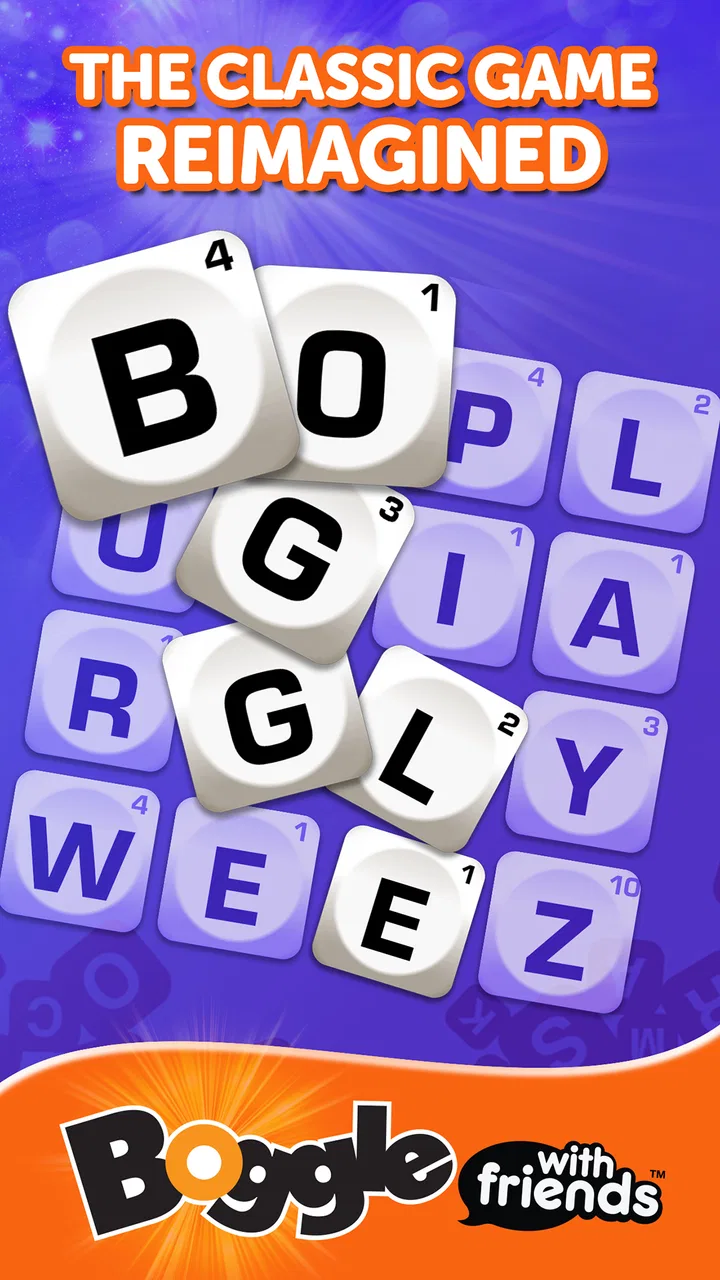
The central letter board is immediately recognizable, which is important for a game that expects quick decisions. I did not need a long tutorial to understand the basic action. The visual hierarchy generally points me toward the grid first, then toward the score and round information. That simplicity helps newcomers because the main task is visible rather than buried behind menus.
The game’s short rounds also reduce the cost of learning. I can try a board, notice how the letter paths work, and adjust on the next attempt without committing to a long session. This is especially useful for players who find complex game interfaces tiring. Instead of learning several systems before reaching the enjoyable part, I can begin searching for words almost immediately.
Still, readability here is not only about whether letters are visible. It is also about how quickly I can distinguish a usable path from a tempting but invalid one. On a small phone, the tiles can feel crowded when I am scanning diagonally or moving rapidly between nearby letters. A larger display gives the board more breathing room, while a smaller screen demands more concentrated visual attention.
Navigation that favors short sessions
The structure works well for the way I actually use this kind of game: a quick round while waiting for an appointment, a short break from work, or a few minutes before bed. The game presents a clear reason to continue, whether that means replaying a challenge, improving a score, or seeing how I compare with another result. That forward motion is convenient, though it can also make the experience feel busier than a traditional paper word search.
One practical habit helped me more than I expected: I pause mentally between rounds instead of tapping through every screen as quickly as possible. That gives me time to check the board, understand the next objective, and avoid beginning a round while my attention is still on the previous result. For players who process information more slowly, this small pause can make the interface feel less demanding.
The game is not equally comfortable for every reading style. Someone who prefers large, static text and a calm layout may find the competitive presentation visually active. Someone who likes clear goals, immediate feedback, and a compact interface will probably find it easier to settle into. I would recommend trying it on the device you plan to use rather than judging the experience from screenshots, because tile size changes the feel considerably.
Learning the rules without memorizing a manual
The strongest accessibility-related quality is the game’s familiarity. People who already know the Boggle format can focus on vocabulary and speed instead of interpreting unfamiliar controls. New players can learn through experimentation: trace a word, see whether it is accepted, and remember the result. That approach is less intimidating than a rule-heavy puzzle game.
There is also a useful distinction between knowing words and finding them under pressure. A player may have a strong vocabulary but still need time to scan the grid. Another player may recognize short words quickly and build a better score through speed. That means the game can be enjoyable for different skill levels, but the competitive format may make some players feel that they are being measured more on reaction time than on language ability.
My advice is to treat early rounds as practice rather than as a judgment of your vocabulary. Concentrate first on moving through the board accurately. Once the gestures become familiar, you can work on longer words, unusual letter combinations, and more efficient scanning patterns. This separates motor learning from word knowledge, which makes improvement feel more manageable.
Motor, sensory, and attention demands during play
The same design that makes a round feel brisk also asks for several kinds of effort at once: reading small tiles, tracking a route, and swiping accurately while the clock is running. I would separate those demands when deciding whether the game suits you, since vocabulary skill alone does not determine comfort. Here I consider the practical effects of movement, visual attention, and sensory load.
Fast tracing is the main physical challenge
The essential interaction involves tracing across adjacent letters. That is satisfying when my finger moves cleanly, but it also creates the game’s clearest motor barrier. Players with limited dexterity, hand tremors, joint pain, or difficulty performing precise swipes may find the timed format frustrating. A missed tile can break a word, and a slow movement can cost opportunities even when the answer is obvious.
This is not a criticism of the core design so much as a trade-off built into the format. The game’s excitement comes from finding words quickly, and quick tracing is part of that pressure. However, the same pressure means the experience is less forgiving than a tap-based word puzzle. If precise swiping is uncomfortable, I would approach it as an occasional game rather than a daily challenge unless the controls feel reliably manageable on your device.
A stylus could make tracing easier for some people, but I would not assume it will improve the experience for everyone. It may offer more control, yet it can also slow down rapid movement. The most useful adjustment is often physical: hold the phone securely, use the hand that gives you the best control, and avoid playing while walking or balancing the device in an awkward position.
Visual scanning matters as much as vocabulary
The board asks me to search in several directions at once. I need to notice letter shapes, remember a possible route, and keep track of where the path can continue. This makes the game a demanding visual-attention exercise even when the words themselves are familiar. Bright surroundings, glare, or a tired display can make that scanning harder, particularly during a timed round.
I get better results when I reduce distractions before starting. Increasing the phone’s general text size may not enlarge every game element, so I would not rely on system settings to solve all readability concerns. Instead, I use a comfortable viewing distance, clean the screen, and avoid playing with strong light reflected across the board. These are simple changes, but they help because the game rewards quick recognition rather than prolonged inspection.
Players sensitive to motion, flashing feedback, or dense visual activity should pay attention to how the game feels during a complete round, not just while browsing menus. The competitive presentation can be energizing, but it may also become tiring after repeated sessions. I found that shorter play periods work better than trying to force a long marathon, especially when my concentration begins to drop.
Sound is optional in my routine, not essential to the puzzle
I usually keep my phone quiet while playing because the letters and board provide the information I need. That makes the game easier to fit into public places, shared rooms, or a workplace break. It also means I can concentrate on visual information without adding another stream of signals.
For players who depend on audio cues, the important question is whether the game communicates enough through sound alone. A word grid is inherently visual, and I would not choose this title as a substitute for an audio-first word game. People with low vision may need to test whether the board and interaction are comfortable with their own device settings and assistive tools. I would describe it as visually led rather than broadly adaptable to every sensory preference.
Attention and time pressure change the difficulty
The clock is more than decoration. It changes how I think. In a relaxed word search, I can inspect a promising cluster repeatedly; here, I must decide whether a possible word is worth tracing now or whether I should keep scanning. That makes the game exciting for players who enjoy pressure, but it can exclude people who need extra processing time.
One useful strategy is to search in layers. I first look for obvious short words, then inspect common endings and beginnings, and only afterward spend time on unusual combinations. This prevents me from getting stuck on one difficult possibility. It also makes the round feel more organized, which helps when the board initially appears overwhelming.
Using it in everyday situations
Because rounds are compact, I can imagine fitting the game into a seated break, but its need for focused attention makes some everyday moments a poor fit. A useful rule is to start only when you can safely give the screen your attention through the round, rather than trying to play while moving or handling another task. The following section weighs those practical trade-offs against slower word-game options.
A good companion for short breaks
I can see this game working well during a coffee break or while waiting for transport, provided I am seated and able to hold the phone comfortably. A round gives the break a clear boundary, unlike an endless social feed that can absorb more time than intended. The word-search format also feels mentally active without requiring a large story, map, or collection of controls to remember.
That convenience comes with a warning: a timed round is not ideal when I may need to respond immediately to someone nearby. I would not start one while crossing a street, supervising a child, or waiting for an important call. The game rewards sustained attention for a short period, so it belongs in moments where focusing on the screen is genuinely safe.
It can also fit a shared household routine. Two people with different abilities can take turns and compare approaches rather than treating every round as a serious competition. One person might spot longer words, while another may be better at quick short-word discoveries. That makes the game more socially flexible than its competitive framing first suggests.
When a slower alternative is better
Compared with a crossword, this game offers less time to reason through a clue and more emphasis on visual discovery. A crossword is usually better for someone who enjoys language, deduction, and deliberate progress. Compared with a standard word-search book, this version is more interactive and competitive, but the phone screen is smaller and the timed structure is less restful.
Compared with a casual anagram game, the connected-letter board gives me a stronger sense of spatial play. I am not only rearranging letters in my head; I am looking for routes across neighboring tiles. That is the main reason I return to it. On the other hand, an anagram game may be more comfortable for someone who wants to tap answers without tracing a path.
For vocabulary practice, I would be cautious about treating every accepted word as a lesson. The game is designed around finding words efficiently, not around explaining definitions or teaching language systematically. It can encourage curiosity when I encounter an unfamiliar word, but anyone seeking structured language learning should pair it with a dictionary or choose an app built specifically for that purpose.
Free to start, with spending worth watching
The game is free to download, which makes trying it straightforward. Its in-app purchases range from $0.99 to $99.99 per item, so I would review purchase settings before handing the phone to a child or using it on a shared account. The Everyone age rating makes it broadly approachable, but an age label does not remove the need for sensible spending controls.
I prefer to decide in advance whether I am playing purely for free or whether I am willing to pay for convenience. That boundary matters in any competitive puzzle, because the desire to continue after a close result can make an optional purchase feel more urgent than it really is. The game is most enjoyable for me when I focus on improving my searching technique rather than chasing every available advantage.
There is also a social consideration. Some players thrive on comparing scores, while others find rankings discouraging. If competition makes a word game feel like a test, I would use it for personal improvement and ignore the comparison layer as much as possible. The underlying board remains enjoyable even when I treat the result as a private challenge.
Barriers that still affect the experience
Knowing the game’s main barriers helps set realistic expectations before a first session: the timed pace and finger tracing may be more limiting than the word puzzle itself. I would test the board on the device you plan to use and notice whether you can follow paths without strain, rather than assuming a familiar format will feel comfortable. The final discussion considers who is most likely to benefit and when another style of word game is a better match.
Small screens can turn speed into strain
The biggest practical limitation is the combination of small tiles and a time-sensitive task. On a compact phone, I sometimes spend effort making sure my finger is on the intended letter instead of thinking about the next word. That is manageable for short sessions, but it can become tiring for players with visual or motor difficulties.
A tablet-sized screen would likely make the board easier to inspect, although portability is part of the appeal of a phone game. I would also avoid assuming that a newer device automatically solves the problem. Screen dimensions, contrast, touch responsiveness, and personal comfort all matter, and the best setup is the one that lets you trace without repeatedly correcting your hand.
Competitive pacing is not universally welcoming
The game’s energy comes from urgency, but urgency can be a barrier. Players who need more time to read, plan, or recover from a mistake may feel disadvantaged even if they understand the rules perfectly. A person with dyslexia, attention differences, or language-processing challenges might enjoy the word hunt while disliking the race against the clock. That is a meaningful distinction: the theme may appeal to them, while the pacing may not.
I would recommend judging the title by the kind of challenge you want. If you want to train rapid visual search and enjoy occasional mistakes, it can be rewarding. If you want to explore words with no penalty for pausing, a book, crossword, or slower puzzle app is likely kinder. Choosing the alternative is not giving up; it is matching the tool to the way you think best.
Device and account habits make a difference
Because this is a mobile game, comfort depends on more than the software. Notifications can interrupt concentration, battery-saving behavior can affect how long I want to play, and a crowded phone screen can make short sessions less pleasant. I keep my play periods intentional and avoid starting a round when the device is nearly out of power or when I need to switch rapidly between tasks.
I also think about who else uses the device. The free entry point is convenient, but the presence of optional purchases means shared phones deserve a little care. A child may understand the word game without understanding the financial consequence of tapping a purchase prompt. Setting boundaries before play is easier than explaining an unexpected charge afterward.
My inclusive verdict for word-game players
Boggle With Friends is most inclusive when the player can comfortably see a letter grid, trace accurately, and enjoy timed competition. Within that audience, it offers a clear entry point, compact sessions, and enough variation in word-finding skill to keep a familiar idea engaging. I appreciate that I can pick it up quickly and still find room to improve through better scanning rather than simply memorizing rules.
Its weaknesses are equally clear. The board is visually led, the tracing interaction favors precise movement, and the pace can punish anyone who needs extra processing time. Those limits do not make it a poor game, but they do mean that the Everyone rating should not be mistaken for a guarantee of effortless access for every player. Comfort has to be tested on the individual device and with the individual player.
For a friend who enjoys fast word puzzles, I would recommend trying it, especially if they like comparing results or fitting games into short breaks. I would suggest a crossword or a slower word-search alternative to someone who wants quiet concentration, detailed vocabulary learning, or generous time to plan. I would also advise anyone with hand or vision difficulties to try a brief session first and stop if tracing becomes uncomfortable.
Zynga’s game has earned a 3.8 average from around 26 thousand ratings, alongside more than 8 thousand written reviews. Those figures suggest a substantial audience with mixed reactions, which matches my own view: the core idea is accessible and immediately understandable, but the competitive delivery will not suit every ability or context. As a free word game, it is easy to sample. The real question is not whether the board works in theory, but whether its speed, size, and tracing style work for you in practice.
My final recommendation is therefore selective rather than universal. Choose it when you want a lively, screen-based word hunt and can give the board your full attention. Skip it when you need a slower pace, low visual demand, or a more structured learning experience. Used in the right setting, it is a satisfying little challenge; used in the wrong one, its strengths quickly become the very barriers that make the session tiring.
FAQs for Boggle With Friends: Word Game
01What is Boggle With Friends: Word Game?
Boggle With Friends: Word Game is a mobile adaptation of the classic word search game where players compete to find as many words as possible within a grid of letters. The game emphasizes quick thinking and vocabulary skills, allowing users to play against friends or random opponents in real-time matches.
02Is Boggle With Friends free to play?
Yes, Boggle With Friends is free to download and play. However, it offers in-app purchases for additional features, such as power-ups and ad-free experience. Players can enjoy the core game without spending money, but purchasing these extras can enhance gameplay and provide a more seamless experience.
03Can I play Boggle With Friends offline?
Boggle With Friends primarily requires an internet connection to function, as it's designed for real-time multiplayer gameplay. While some features may be available offline, such as practice modes, the full experience, including playing against friends or global opponents, requires internet access for gameplay and updates.
04How does the matchmaking system work in Boggle With Friends?
The game uses a matchmaking system to pair players with opponents of similar skill levels. You can also choose to play against friends by connecting through social media accounts or inviting them directly. This ensures a balanced and competitive experience, allowing players to enjoy challenging matches tailored to their skill level.
05What accessibility features are included in Boggle With Friends?
Boggle With Friends includes various accessibility options to accommodate different player needs. These may include adjustable text sizes, color contrast settings, and voice-over support. The game is designed to be inclusive, ensuring that players with different abilities can enjoy the game comfortably. Be sure to check the settings menu for more options.
Pros
- Engaging multiplayer mode.
- Variety of word challenges.
- Daily rewards boost motivation.
- User-friendly interface.
- Connect with friends easily.
Cons
- Frequent ads can be intrusive.
- In-app purchases can be pricey.
- Occasional connectivity issues.
- Limited offline play options.
- Repetitive for solo players.

Boggle With Friends: Word Game
Gallery